Plan Your Button-Based Chatbot
A button-based chatbot guides visitors through a structured conversation using clickable options. Unlike an AI chatbot that answers freely, a…
A button-based chatbot guides visitors through a structured conversation using clickable options. Unlike an AI chatbot that answers freely, a button-based bot follows a predetermined flow that you design. This guide helps you plan your flow before building it.
How Button-Based Bots Work
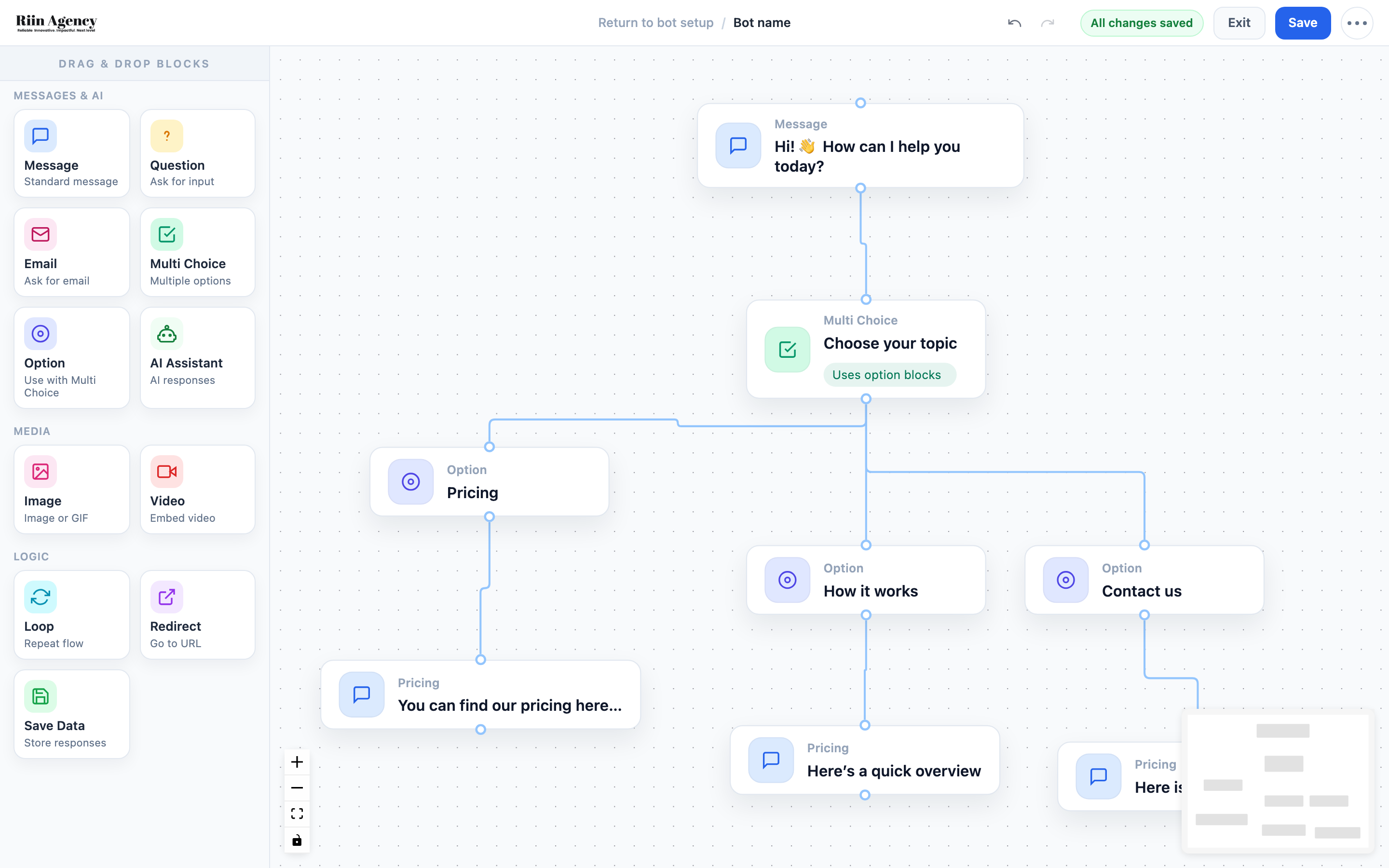
A button-based bot is built in the Flow Builder using drag-and-drop blocks. The conversation follows a set path: you show a message, offer choices (buttons), and each choice leads to the next step. Think of it like a decision tree.
Planning Your Flow
1. Define Your Goal
What should the chatbot achieve? Common goals include: collecting leads (name, email, phone), answering FAQs, booking appointments, or guiding visitors to the right page. Pick one main goal — you can always expand later.
2. Map Out the Conversation
Sketch your flow on paper or in your head. A simple lead generation flow might look like:
- Welcome message → “Hi! How can I help you today?”
- Multi Choice → Pricing / Our Services / Contact Us
- Each option → A short answer + follow-up question
- Email block → Ask for their email
- Thank you message → “Thanks! We’ll be in touch.”
3. Keep It Short
Visitors lose interest after 4–5 steps. Get to the point quickly. Every step should have a clear purpose — if it doesn’t add value, remove it.
4. Write Your Messages
Draft the text for each message block. Keep messages short (1–2 sentences), friendly, and action-oriented. Use the button labels to make choices clear — “See Pricing” is better than “Option 1”.
Available Block Types
- Message — display a text message
- Question — ask for free-text input
- Email — ask for and validate an email address
- Multi Choice — show multiple buttons for the user to choose from
- Option — define what happens when a specific button is clicked
- Image / Video — show media content
- Loop — repeat a section of the flow
- Redirect — send the user to a URL
Quick Planning Checklist
- Main goal defined (lead gen, FAQ, booking, etc.)
- Conversation flow mapped out (max 4–5 steps)
- Messages written for each step
- Button labels decided
- What data to collect decided (email, name, phone)
Ready to build? See “Creating Your First Bot” for the step-by-step building guide, or “Create a Lead Generation Chatbot” for a complete tutorial.
Flow Builder Explained
The Flow Builder is where you design your chatbot's conversation. Using a visual drag-and-drop interface, you connect blocks to create…
Integrating AI-bot with button based bots
One of the most powerful features in the Flow Builder is the ability to combine button-based flows with AI-powered conversations….